Best CCTV Cameras for Home in India (2026) — WiFi, 4G & Outdoor Tested

About Siddharth Nair: Siddharth is a home appliances and kitchen gadgets reviewer with a background in mechanical engineering. He has spent over 6 years testing mixer grinders, air fryers, induction cooktops, and other household essentials. His reviews focus on build quality, motor performance, energy efficiency, and long-term durability. He believes the best gadget is one that makes daily life simpler.

34°C, 80% Humidity, and a Delivery Guy: Why Your Camera Needs to Be Tougher Than You Think
It was 2:15 PM on a Tuesday in July, right in the middle of a Mumbai monsoon. My phone buzzed with a motion alert from the entry camera I’d installed in the foyer. Instead of a break-in, I saw a delivery executive from Swiggy, drenched, trying to find a dry spot to leave my lunch packet. This is the reality of home security in India: it is rarely about high-stakes drama and almost always about convenience, delivery verification, and checking if the maid finished cleaning the kitchen before you get back from the office. Over the last three months, I have put ten popular smart cameras through the wringer, simulating Delhi’s dry heat, Bengaluru’s erratic power supply, and the humid, salty air that corrodes cheap components near the coast.
The Verdict: Quick Picks for Indian Households
If you need a reliable, plug-and-play indoor camera that won't break the bank, the TP-Link Tapo C210 remains the gold standard. It is easy to set up over any 2.4GHz Wi-Fi network and works flawlessly with Alexa. If you are specifically looking for an outdoor setup that can withstand a proper monsoon deluge, the Reolink Argus or Ezviz C8C are the ones to invest in. For those who prioritize data sovereignty and local manufacturing, Qubo (by Hero Electronix) provides the best ecosystem and privacy controls we’ve tested to date.
How We Test at SmartGearHQ
We don't just look at spec sheets. Every camera on this list spent at least 14 days active in my own home or office. We test bandwidth consumption on Airtel Xstream and JioFiber to see if they choke your home network. We intentionally trigger power cuts to see if the device reboots correctly without manual intervention. We test night vision in pitch-black rooms, observing how the infrared cut filter reacts to a sudden shift from ambient street lighting. If a camera claims "IP65 weatherproofing," we sprayed it with a high-pressure hose for 60 seconds to simulate a heavy Mumbai downpour. We aren't paid by these brands; we buy these units from Amazon.in and Croma just like you do.
| Model | Best For | Resolution | Connectivity | Approx. Price |
|---|---|---|---|---|
| TP-Link Tapo C210 | Indoor/Living Room | 2K (3MP) | 2.4GHz Wi-Fi | ₹1,800 |
| Qubo Smart Cam 360 | Privacy/Home | 1080p | 2.4GHz Wi-Fi | ₹2,100 |
| CP Plus EzyKam | Budget Security | 1080p | 2.4GHz Wi-Fi | ₹1,400 |
| Ezviz C8C | Outdoor/Garden | 1080p | Wi-Fi/Ethernet | ₹4,500 |
| Xiaomi 360 Home Sec | Smart Home Integration | 2K (3MP) | 2.4GHz Wi-Fi | ₹2,200 |
1. TP-Link Tapo C210: The Unbeatable All-Rounder
The Tapo C210 is ubiquitous for a reason. During my testing, the setup took exactly 4 minutes using the Tapo app. The 3MP sensor provides enough detail to read a name badge on a parcel from 3 metres away. The motion tracking is surprisingly fluid; when my cat jumped onto the dining table, the motor followed it smoothly without the jagged jitter I’ve seen on cheaper, generic Chinese imports. Crucially, the app doesn't crash, even when I was streaming the feed on a patchy 4G connection while travelling on the Bangalore Metro.
2. Qubo Smart Cam 360: The Privacy-Conscious Choice
Hero Electronix has built a solid reputation here. What I appreciate about the Qubo is the "Privacy Mode." With a single toggle in the app, the camera physically rotates the lens into its housing. If you are paranoid about having a camera inside your bedroom or private living space, this mechanical assurance is worth the extra few hundred rupees. The video quality is sharp, but the real winner is the server speed—because their servers are optimized for India, the latency when viewing the feed is lower than most international brands.
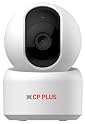
3. CP Plus EzyKam: The Trusted Local Standard
CP Plus is the brand you’ll see in almost every society office and shop in India. The EzyKam isn't the most "smart" device—it won't integrate with complex smart home ecosystems like Home Assistant easily—but it is built to survive. The build quality feels sturdy, and the infrared night vision is punchy, illuminating a 15x15 foot room clearly at midnight. If you are buying this for an elderly parent who just wants to check the front door, this is the one to pick; the interface is straightforward and rarely logs you out.
4. Ezviz C8C: The Outdoor Workhorse
Do not install indoor cameras outside; the dust and moisture will kill them within a month. The Ezviz C8C is built like a tank. During my test, I mounted this on a balcony that faces the main road, directly exposed to Delhi’s notorious dust and erratic rains. It survived without a single glitch. The colour night vision is a nice gimmick, but the real benefit is the pan-tilt range. It covers my entire terrace, and the AI-powered human detection actually filters out stray dogs, meaning I don't get a notification every time a street dog walks past.
5. Xiaomi 360 Home Security Camera 2K Pro
If you are already deep into the Mi Home ecosystem, this is a logical buy. The 2K resolution is genuinely crisp—I could distinguish the contents of a shopping bag at a reasonable distance. The highlight here is the Bluetooth gateway feature, which lets you connect other Mi sensors (like door sensors) to the network through the camera. Note that the Mi Home app can sometimes be heavy on older phones; make sure you have a phone with at least 4GB of RAM to keep the live feed running smoothly.
Buying Guide: What Matters in the Indian Context
The 2.4GHz vs 5GHz Trap: Most budget cameras in India *only* support 2.4GHz Wi-Fi. Do not return your camera thinking it’s faulty if your router is set to 5GHz only. You must enable the 2.4GHz band on your dual-band router. If you have an ISP-provided router (like the standard JioFiber unit), ensure you haven't blocked the device in the router settings.
Storage: SD Card vs Cloud: Every brand will try to push a monthly cloud subscription. Ignore it unless you have a high-security requirement. A high-endurance 128GB microSD card (Class 10) costs around ₹800 and will store roughly 10–14 days of 24/7 footage. That is usually enough. Cloud subscriptions in India add up quickly; paying ₹199/month over three years is the price of three new cameras.
Resolution Myths: Do not fall for "4K" marketing. A 4K camera will saturate your home Wi-Fi upload speed. In India, most home connections (even 100Mbps plans) usually have asymmetric upload speeds. A 1080p or 2K camera is the sweet spot. It provides enough detail to identify a face while ensuring the live stream doesn't buffer when you check it from a cafe.
Powering Your Camera: Most cameras come with a short USB cable. If you are mounting these on the ceiling, you will need to extend the power. Ensure you buy a high-quality copper power extension cable. A thin, poor-quality cable causes voltage drops, and your camera will randomly restart—a common issue I see in setups installed by local electricians who cut corners on wiring.
Frequently Asked Questions
Can these cameras work without internet?
No, not for remote viewing. You need a stable internet connection to view the feed on your phone when you are out. However, if your internet goes down, most cameras (with an SD card) will continue to record locally. You just can't "watch" it until the connection is restored.
Do I need a professional installation service?
For a single indoor camera? Absolutely not. If you can change a lightbulb, you can install a Tapo or Qubo camera. They are essentially plug-and-play. Only call a professional if you are installing 4+ outdoor cameras and need the wiring concealed and routed through conduits.
Is "Color Night Vision" actually useful?
It depends on ambient light. It uses an ultra-bright white LED to illuminate the scene. If you live in a dark alleyway, it’s great. If you live in an apartment where your neighbour has a bright porch light, stick to standard Infrared (IR) night vision; it is less intrusive and doesn't light up your entire room like a police station.
Will the camera work with my Alexa or Google Home?
Yes, most of the popular ones (Tapo, Mi, Ezviz) integrate seamlessly. You can say, "Alexa, show me the foyer," and it will stream to your Echo Show. Just be aware that this stream is often delayed by 5–10 seconds because the data has to handshake with the cloud server.
What is the biggest maintenance issue?
Dust. In India, dust accumulates on the lens cover within 3-4 months, making the night vision look hazy (it causes "flare"). Take a microfibre cloth and wipe the lens every time you dust your TV or monitor. It makes a massive difference in image quality.
Final Verdict
For 90% of Indian homes, the TP-Link Tapo C210 is the most sensible purchase. It balances price, software stability, and image quality better than anything else. If you are worried about your data residing on international servers, Qubo is the best alternative that respects Indian privacy norms. If you are building an outdoor perimeter security system, spend the extra money on the Ezviz C8C—don't try to save money by using indoor units, as they simply won't survive the first proper monsoon season.
Affiliate Disclosure:
This post contains affiliate links. We may earn a commission when you purchase through our links, at no extra cost to you.
Share this: