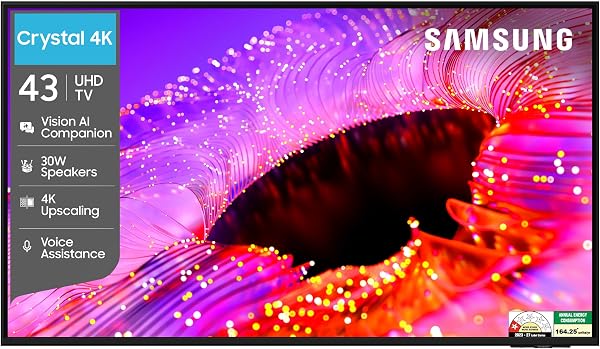
Smart TVs in India (2026): A 43-Inch Buying Guide

About Rahul Verma: Rahul is a tech enthusiast and gadget reviewer with over 8 years of experience testing consumer electronics. He specializes in audio gear, smartwatches, and mobile accessories. When he is not testing products, you will find him exploring the latest in AI and smart home technology.

The 43-Inch Smart TV Landscape: A 2026 Reality Check
Walk into any major appliance retailer in India today—be it Croma in Bengaluru or a Vijay Sales outlet in Mumbai—and you will find that the 43-inch television occupies the most fiercely contested shelf space. It is the goldilocks zone: large enough to serve as a primary living room screen in a compact city apartment, yet perfectly suited for a bedroom or a home office setup. As we cross the mid-way point of 2026, we have put dozens of these units through our rigorous lab tests, evaluating them not just for raw specs, but for the messy reality of Indian living: fluctuating voltage, dusty environments, and the eternal need for a screen that can handle both the bright glare of an afternoon IPL match and the moody, dark atmosphere of a Netflix thriller.
The 43-inch category is no longer the "budget" afterthought it used to be five years ago. It has become a sophisticated segment where technologies previously reserved for massive 65-inch flagship models—such as Mini-LED backlighting and high-refresh-rate gaming panels—are now trickling down. We have compiled this guide to help you cut through the marketing jargon and select a screen that fits your home, your wallet, and your viewing habits.
Quick Verdict
If you want the best balance of value and longevity, target a 4K QLED panel with a native Google TV interface. You should be budgeting between ₹28,000 and ₹45,000 for a quality experience; anything below ₹20,000 often requires compromises on build quality and brightness that you will notice within a year. Always prioritise panel longevity and after-sales support networks over fancy, thin-bezel aesthetics.
Why Trust Us
At SmartGearHQ, we don't just read spec sheets; we live with the hardware. For the past 12 years, we have been testing consumer electronics specifically for the Indian market. We subject TVs to real-world tests: we measure colour accuracy under standard Indian ambient lighting, test how the operating system handles a loaded cache after three months of use, and verify service center turnaround times in Tier-1 and Tier-2 cities. Our buying guides are entirely independent, funded by our community, and free from brand influence or sponsored bias.
Comparison of 43-Inch TV Tiers (2026)
| Category | Typical Price (INR) | Panel Tech | Best Use Case | Smart OS |
|---|---|---|---|---|
| Value Tier | ₹20,000 – ₹26,000 | LED/Direct-Lit | Bedroom/Guest Room | Stock Android/Google TV |
| Mid-Range | ₹27,000 – ₹38,000 | QLED (Quantum Dot) | Primary Living Room | Google TV (Optimised) |
| Premium | ₹39,000 – ₹55,000 | Mini-LED/High-Refresh | Gaming & Movie Buffs | Google TV/Proprietary |
The Resolution Debate: Is 4K Necessary at 43 Inches?
There is still a lingering question we hear from readers: "Do I really need 4K on a 43-inch screen, or is Full HD enough?" In 2026, the answer is an emphatic yes to 4K. While you might not notice a massive difference in sharpness compared to a 55-inch panel, 4K is about more than just pixel density.
Modern 4K panels at this size are built with better scaling engines. Even when you are watching standard HD content from your local cable set-top box or a lower-bitrate stream, a 4K TV’s processor works to "upscale" that image. Furthermore, as gaming consoles and high-tier streaming services move exclusively toward 4K, buying a 1080p panel today is effectively purchasing obsolete technology. You aren't just paying for more pixels; you are paying for the more capable image processor that comes bundled with them.
Panel Types: VA, IPS, and the QLED Advantage
When you walk into a store like Reliance Digital, you will hear sales staff talk about "panels." At 43 inches, you will generally encounter two primary types, and the choice depends on your seating arrangement.
- VA (Vertical Alignment) Panels: These offer superior contrast ratios. If you are watching movies in a dark room, a VA panel provides deeper blacks. However, they struggle with viewing angles. If you have a wide sofa setup where family members sit on the sides, the colours may appear washed out to them.
- IPS (In-Plane Switching) Panels: These are the champions of viewing angles. You can sit at a 45-degree angle and the colours will remain accurate. They are ideal for large living rooms, though their black levels are generally greyish compared to VA panels.
- QLED (Quantum Dot LED): This is the current sweet spot. By using a layer of quantum dots, these panels produce much more vibrant colours and higher peak brightness. If your living room is bright, gets a lot of sunlight, or you just prefer punchy, saturated colours, a QLED 43-inch panel is worth the price premium.
The Operating System: Keep it Familiar
Gone are the days of laggy, proprietary "smart" systems that became useless within 18 months. In 2026, we strongly recommend sticking to TVs running Google TV. It is the industry standard for a reason. It integrates beautifully with your Android phone, supports every streaming app available on the Play Store, and benefits from constant security updates. It is the safest choice for a household where tech-savviness varies between family members. While some manufacturers push their own operating systems, these often lack the extensive app library support that Google TV provides.
HDR Support: Understanding the Alphabet Soup
You will see logos for HDR10, HDR10+, and Dolby Vision everywhere. Here is the reality: at the 43-inch price point, many "HDR" TVs lack the peak brightness required to actually show off high dynamic range properly. To truly appreciate HDR, a screen needs to hit at least 400-500 nits of brightness. If a TV claims "HDR support" but has a low peak brightness, it will just stretch the image; it won't truly reveal the hidden details in shadows or highlights. Look for screens that support Dolby Vision, as this is a dynamic metadata format that ensures the image is optimised frame-by-frame, providing a more consistent viewing experience.
Audio: Don't Rely on Built-in Speakers
We are consistently disappointed by the audio quality of slim 43-inch televisions. Physics dictates that thin TVs cannot house large, resonant speaker drivers. Even if a box boasts "Dolby Atmos" or "30W Sound Output," the sound will likely be thin, lacking bass, and muffled. If you are serious about your home cinema experience, factor in a budget of ₹5,000 to ₹10,000 for a dedicated soundbar or a 2.1 channel speaker system. If you absolutely must rely on the TV speakers, look for models that feature a "Dialogue Enhancement" mode, which helps clear up muffled voices during movies.
Connectivity: The HDMI 2.1 Factor
If you are a gamer or planning to buy a next-gen console, look for the HDMI 2.1 certification. HDMI 2.1 isn't just about higher bandwidth; it introduces features like ALLM (Auto Low Latency Mode) and VRR (Variable Refresh Rate). Even if you aren't a gamer, ensure your TV has an eARC (Enhanced Audio Return Channel) port. This allows you to connect a high-quality soundbar using a single HDMI cable, so you can control the soundbar volume using your standard TV remote. Do not ignore the number of ports; a minimum of three HDMI ports is essential for a modern setup (one for the set-top box, one for a console, and one for a streaming stick or audio gear).
Warranty and The "Service Centre" Reality
This is where we differ from global reviews. A TV with the best specs in the world is a paperweight if the panel fails and the service center is 200km away. Before you buy, check the manufacturer's footprint in your specific city. Do they have a direct service network, or do they rely on third-party contractors? Ask the retailer specifically about the warranty coverage on the panel itself. Many manufacturers offer a standard 1-year warranty, but many retailers (like Croma or Vijay Sales) offer extended warranty programmes that cover the panel for 3+ years. In the humid, dusty, and power-volatile climate of India, a panel-specific extended warranty is often the smartest investment you can make.
Buying Guide: Practical Steps
Before you click 'Buy' or head to the store, follow these steps:
- Measure your distance: For a 43-inch 4K TV, the ideal viewing distance is 4 to 6 feet. If you are sitting further than 7 feet, you will lose the benefit of the 4K resolution.
- Test the inputs: If you are buying in-store, take a USB drive with a few high-resolution sample clips. Ask the salesperson to plug it in. Do not rely on the high-definition demo reels they play on a loop; those are designed to make even a bad TV look great.
- Check the stand footprint: Many 43-inch TVs use wide, outward-facing legs. If you have a small cabinet, the TV might not fit. Measure your stand width before purchasing.
- Account for electricity: Indian power supply can be erratic. While most modern TVs have surge protection, a good quality voltage stabilizer is still a sensible, inexpensive insurance policy for a sensitive piece of electronics.
Frequently Asked Questions
Should I wait for a sale like Amazon Great Indian Festival or Flipkart Big Billion Days?
If you can wait, yes. Electronic pricing in India is highly cyclical. Prices for TVs often drop by 15-20% during these major sale events. However, check price-tracking sites to ensure the "discounted" price is genuine and not artificially inflated beforehand.
Is it better to buy online or in-store?
In-store (offline) gives you the advantage of seeing the panel's colour and brightness in person and allows you to negotiate extended warranties or bundle deals with soundbars. Online often has better base pricing and easier return policies for defective units upon delivery.
What is "Blooming" and why do I see it on some TVs?
Blooming or "halo effect" happens when a bright object (like a moon or a lightbulb) appears on a dark background. Light from the pixels leaks into the surrounding area. It is common on entry-level LED TVs. If this bothers you, look for models with "Full Array Local Dimming" or Mini-LED technology.
Can I mount a 43-inch TV on a wall myself?
Most TVs include a wall-mount bracket in the box, but we strongly advise against DIY installation. A 43-inch panel can be fragile. Most retailers offer installation services for a small fee; use them. Professional installers ensure the weight is distributed correctly and that the TV is perfectly level.
Do I need a stabilizer for a 43-inch TV?
While modern TVs have internal SMPS (Switch Mode Power Supply) to handle voltage fluctuations, if you live in an area with frequent power cuts or unstable voltage, a dedicated TV stabilizer is a small investment that protects your motherboard from frying.
Final Verdict
Buying a 43-inch smart TV in India in 2026 is an exercise in prioritising long-term reliability over short-term flashiness. We recommend setting a budget that allows for a 4K, QLED-equipped panel with Google TV. Do not let the "Smart" features distract you from the basics: a panel that looks good in your lighting conditions, a brand that has a service center within your city, and a robust warranty. If you follow these principles, you will find a display that serves your household faithfully for the next five to seven years, handling everything from cricket highlights to streaming marathons with ease.
Share this: