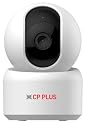
Technoview Full HD WiFi Wireless Security Camera 1080p Audio Video Live View: The Complete Buyer's Guide for Indian Homes

About Rahul Verma: Rahul is a tech enthusiast and gadget reviewer with over 8 years of experience testing consumer electronics. He specializes in audio gear, smartwatches, and mobile accessories. When he is not testing products, you will find him exploring the latest in AI and smart home technology.

You're at work in Bengaluru, your parents are home in Kochi, and you want to know they're fine. Or your flat in Pune gets a delivery while you're stuck in traffic. Or you simply want to check whether your child's nanny is actually following the routine you agreed on. A cheap, plug-and-play WiFi camera solves all three problems — and the technoview full hd wifi wireless security camera 1080p audio video live view model is one of the most searched budget options on Amazon India for exactly this reason.
But here's the honest part most listings won't tell you: not every ₹1,500 camera is worth your money, and the cheapest one isn't automatically the best value. In this guide, I'll walk you through what the Technoview 1080p WiFi camera actually does, how it compares with similarly priced options from TP-Link, Mi, CP Plus and Imou, what it will and won't handle in an Indian home, and — most importantly — when and where to buy it so you don't overpay by 40%.
Understanding the Technoview Full HD WiFi Wireless Security Camera 1080p Audio Video Live View
Strip away the long product title and you get a fairly simple device: a small indoor camera that connects to your home WiFi router, streams 1080p video to your phone, records audio as well as video in both directions, and lets you watch a live feed from anywhere with an internet connection. That's the core of it.
What "1080p Audio Video Live View" Actually Means
1080p refers to Full HD resolution — 1920 × 1080 pixels, roughly 2 megapixels. In CCTV terminology that's a "2MP" camera. It's the current baseline; anything below 720p is a false economy because number plates, faces and small objects become mush when you zoom in.
Audio video means the camera has a built-in microphone and speaker, so it records sound and supports two-way talk. This is genuinely useful in Indian homes — you can tell the delivery agent to leave the parcel at the door, or calm a pet that's barking.
Live view means real-time streaming through the companion app, usually with a snapshot and recording button, and often with a grid of multiple cameras if you add more than one later.
Typical Specifications You Should Expect
- Resolution: 1080p (2MP), with a wide-angle lens somewhere in the 105°–130° range
- Night vision: 6–8 infrared LEDs, usable range typically 5–10 metres in total darkness
- Pan/tilt: many Technoview variants are fixed-lens; motorised 355° pan and 90°–110° tilt models cost more. Verify this on the listing before you buy.
- Connectivity: 2.4 GHz WiFi only — not 5 GHz
- Storage: microSD card slot (usually up to 64 GB or 128 GB), some variants offer optional cloud storage
- Power: 5V/1A micro-USB adapter with a 1–1.5 metre cable
- App: a generic IoT app such as V380, Tuya Smart or Smart Life, depending on the batch
Why WiFi Cameras Make Sense for Indian Homes
Traditional CCTV — a DVR box, four bullet cameras, coaxial cable run through walls — costs ₹12,000–₹25,000 installed and requires drilling and cabling. A WiFi camera costs a fraction of that, needs one plug point, and takes about ten minutes to set up. For renters, this matters enormously: you can install it in an hour and take it with you when you shift flats.
That said, be clear about the trade-off. A ₹2,000 WiFi camera is not a replacement for a proper 4-camera NVR system if you're securing a 3BHK or an independent house perimeter. It is a supplementary device for one or two specific spots — the main door, the living room, a child's room, a shop counter, or the space where your domestic help works.
Key Factors to Consider Before Buying the Technoview WiFi Camera
1. Confirm the Lens Type — Fixed vs Pan/Tilt
This is the single biggest source of buyer disappointment. A fixed-lens camera covers one angle. If you mount it at the front door, you see the front door and perhaps 2 metres of corridor. A pan/tilt model rotates 355° horizontally and lets you sweep an entire room from your phone. Technoview sells both, and the price difference is often only ₹400–₹700. If you're placing it in a living room or shop, pay the extra for pan/tilt.
2. Night Vision Quality Is Not the Same as Night Vision Range
Every listing claims "night vision." What matters is the effective IR distance and whether the camera switches to black-and-white IR mode or uses colour night vision (usually with a built-in spotlight). For a 12 × 14 ft bedroom, a 5-metre IR range is plenty. For a shop counter 15 metres away from the camera, it isn't. Check the stated IR distance and buy accordingly.
3. Storage: microSD Card vs Cloud
The Technoview full hd wifi wireless security camera 1080p audio video live view model primarily records to a microSD card. A 64 GB Class 10 card typically holds around 4–6 days of continuous 1080p recording; with motion-triggered recording, that stretches to two weeks or more. Card-based storage means no recurring subscription — a genuine advantage for Indian buyers.
If cloud storage is offered, verify whether it's mandatory or optional, where the servers are located, and whether there's a free tier. Many budget cameras advertise "cloud" but require a paid plan after a 7-day trial.
4. The 2.4 GHz WiFi Constraint
This trips up a lot of people. Budget WiFi cameras almost never support 5 GHz bands. If your router broadcasts only a 5 GHz SSID (common with some Jio and Airtel fibre setups where bands are split), the camera simply won't appear during setup. You'll need to log into your router and enable the 2.4 GHz band, then pair the camera to that network. Do this before you start cursing the product.
5. Power Supply and Cable Length
These cameras need continuous mains power — there's no battery. The bundled cable is usually short. If you're mounting it high on a wall near the main door and the nearest socket is 4 metres away, budget ₹200–₹400 for a longer micro-USB cable and a 5V/2A adapter. Avoid daisy-chaining extension boards to a security device; if the power goes, the camera goes dark.
6. App Quality and Data Privacy
Budget Chinese-origin cameras use generic apps. Check recent reviews for two things: whether the app is stable on current Android versions, and whether it pushes excessive ads. Also, immediately after setup, change the default password, enable two-factor authentication if offered, and keep the camera firmware updated. Never leave a camera on the factory default password.
Technoview Camera Options and Price Points in India
Prices on Amazon and Flipkart fluctuate constantly — they move by 20–30% between a normal week and a festive sale. Here's the realistic landscape as of 2025.
Budget Tier: ₹1,299 – ₹1,999 (Entry Technoview 1080p Fixed Camera)
This is the classic Technoview full hd wifi wireless security camera 1080p audio video live view listing — a fixed-lens indoor camera, 1080p, IR night vision, two-way audio, microSD slot up to 64 GB, in a compact plastic housing. At this price you get the essentials and nothing more.
Who it's for: First-time buyers who want one camera for a single fixed angle — a doorway, a shop till, a child's study desk.
What to watch: Plastic build quality is basic, the app can be clunky, and the field of view is fixed. Don't expect crisp license plate capture at 10 metres.
Mid Tier: ₹1,999 – ₹2,799 (Technoview Pan/Tilt or 2-Camera Bundle)
At this pricing you're typically looking at either a motorised pan/tilt single camera or a two-camera pack of the fixed model. If you need coverage of two locations — say, the front door and a back balcony — the twin pack is the smarter buy. A single pan/tilt unit, meanwhile, can cover an entire living room for the price of one camera.
Who it's for: Families wanting whole-room coverage, or households that need two viewpoints.
What to watch: Pan/tilt motors are noisy — the audio pickup will catch the motor whirr during rotation.
Premium Tier: ₹2,999 – ₹4,499 (2K Resolution and Outdoor-Capable Alternatives)
Above ₹3,000, the value proposition changes. Brands like TP-Link Tapo, Xiaomi and Imou offer 2K (3MP) resolution, better optics, more reliable firmware, and stronger app ecosystems at this price. If your budget reaches here, it's worth comparing seriously rather than defaulting to the cheapest 1080p option.
Comparison: Technoview vs Popular Alternatives in India
| Camera | Resolution | Pan/Tilt | Two-Way Audio | Storage | Approx. Price | Best For |
|---|---|---|---|---|---|---|
| Technoview Full HD WiFi Camera (fixed) | 1080p | No | Yes | microSD up to 64 GB | ₹1,299 – ₹1,899 | Lowest-cost single-angle monitoring |
| Technoview Pan/Tilt variant | 1080p | Yes (355°) | Yes | microSD up to 128 GB | ₹1,999 – ₹2,499 | Whole-room coverage on a budget |
| TP-Link Tapo C200 | 1080p | Yes (360°) | Yes | microSD up to 256 GB | ₹2,299 – ₹2,799 | Reliable app, better build quality |
| Mi 360° Home Security Camera 2K | 2K (1296p) | Yes (360°) | Yes | microSD up to 128 GB | ₹2,999 – ₹3,499 | Sharper video, polished software |
| Imou Ranger 2 | 1080p | Yes (355°) | Yes | microSD up to 256 GB | ₹2,199 – ₹2,699 | Dahua-backed brand, human detection |
| Qubo Smart Cam 360 | 1080p | Yes (360°) | Yes | microSD + cloud | ₹3,299 – ₹3,999 | Indian support, Hero Group backing |
Prices are indicative for 2025 and change frequently with bank offers and festive sales. Always check the live listing before purchasing.
Pros and Cons of the Technoview 1080p WiFi Camera
What Works Well
- Genuinely low entry price. At under ₹2,000, it's the cheapest way to add a monitored viewpoint to your home without any wiring or monthly fee.
- No subscription required. Local microSD recording means you own your footage and pay nothing recurring — important for budget-conscious households.
- Two-way audio works reliably. Voice through the speaker is loud enough to be heard across a room, useful for talking to delivery staff or elderly parents.
- Quick setup. Most users are up and running within 10–15 minutes using the QR-code pairing flow in the app.
- Compact and unobtrusive. The small housing sits easily on a shelf or a wall bracket without looking industrial.
Where It Falls Short
- App experience is basic. Generic IoT apps tend to be less polished than TP-Link Tapo or Mi Home — expect fewer features, occasional lag, and sometimes ads.
- Fixed-lens variants limit coverage. Unless you specifically buy the pan/tilt model, you're locked to one angle forever.
- 1080p is the floor, not the ceiling. Faces are recognisable at 3–4 metres but less so beyond 6 metres.
- Build quality is budget-tier. These are indoor cameras — don't mount them where they'll get rained on, and avoid direct afternoon sun on the housing.
- Limited after-sales support. Brand service networks for budget camera labels are thin compared with CP Plus, Hikvision or Qubo.
Buying Guide: Where and When to Buy in India
Amazon vs Flipkart vs Local Dealers
Amazon India is generally the primary listing for Technoview products, with the widest variant selection and the most detailed review history. Look for the "Sold by" and "Fulfilled by Amazon" tags — FBA listings are far easier to return if the unit arrives with a faulty sensor or a dead IR LED.
Flipkart often matches Amazon on price for these budget cameras and sometimes undercuts during Big Billion Days. Check both before clicking buy; a ₹300 difference on a ₹1,800 product is meaningful.
Local CCTV dealers are worth a visit if you want the camera installed on a wall properly and want a person to call if something breaks. Expect to pay ₹300–₹600 extra for the device plus ₹500–₹1,000 for installation — but you get a physical point of accountability, which matters if you're buying for elderly parents.
Best Times to Buy
- Amazon Great Indian Festival (Sept–Oct) and Prime Day (July) — the deepest discounts on budget cameras, often 30–40% off MRP.
- Flipkart Big Billion Days (Sept–Oct) — competitive pricing, especially on bundled 2-packs.
- Republic Day and Diwali sales — good secondary windows if you can wait.
- Bank offers — HDFC, ICICI and SBI card discounts routinely shave ₹150–₹400 off electronics, which is a bigger percentage cut on a ₹1,500 product.
- Avoid buying right before a major sale. If the Great Indian Festival is two weeks away, hold. The same camera regularly drops by 25%.
Red Flags on the Listing
- No mention of the app name — a sign of a generic rebranded unit with no support path
- "Cloud storage free" with no fine print about the trial period
- Reviews clustered in a single week (a likely sign of incentivised reviews)
- Claims of "4MP/5MP" on a camera priced under ₹1,500 — interpolated resolution, not true sensor resolution
- No seller warranty beyond the standard 1-year replacement
Practical Installation and Usage Tips for Indian Homes
Placement
Mount the camera at roughly 7–9 feet, angled slightly downward. Higher than that and you mostly capture the tops of heads; lower and it's within easy reach of anyone who wants to cover the lens. For a main-door camera, position it so the door itself and the corridor in front are both visible — not just the inside of your hallway.
Dealing with Power Cuts
This is a real Indian constraint that reviews rarely mention. During a power cut, the camera stops recording. If your area has frequent outages, connect the camera's adapter to a small 600VA UPS (₹2,000–₹3,000) — that will keep it running for several hours. Alternatively, mount it near a socket that's already on an inverter circuit.
WiFi Stability
Keep the router within 8–10 metres of the camera, and avoid mounting the camera behind a thick concrete wall or a metal cabinet. If the live feed stutters or drops every few minutes, the problem is almost always signal strength, not the camera. A ₹700 WiFi range extender solves it in most flats.
Storage Card Choice
Buy a branded Class 10 or UHS-I microSD card — SanDisk, Samsung, or Strontium. Cheap cards fail in weeks under continuous write cycles, especially in Indian summer temperatures. A 64 GB high-endurance card costs around ₹600–₹900 and is the correct choice for 24×7 recording.
Privacy Hygiene
Change the default password on day one. Never point the camera at a bedroom or bathroom door. If the app offers it, enable local-only recording and disable cloud sync unless you actually need it. And if you're monitoring domestic help or a nanny, be aware that covert recording carries legal and ethical implications in India — transparent placement is both safer and fairer.
Motion Alerts Without the Noise
Budget cameras trigger alerts on any pixel change — a ceiling fan, a passing car's headlights through a window, or a pet will flood your phone with notifications within a day. Set the motion sensitivity to medium or low, and use the app's activity zone feature (if available) to mask out ceiling fans and windows.
Frequently Asked Questions
Is the Technoview full hd wifi wireless security camera 1080p audio video live view worth buying?
Yes, if your expectation is a single indoor viewpoint for under ₹2,000 with no monthly fee. It's a genuinely useful product for monitoring a doorway, a shop counter, or an elderly parent's living room. It's not the right
Affiliate Disclosure:
This post contains affiliate links. We may earn a commission when you purchase through our links, at no extra cost to you.
Share this: