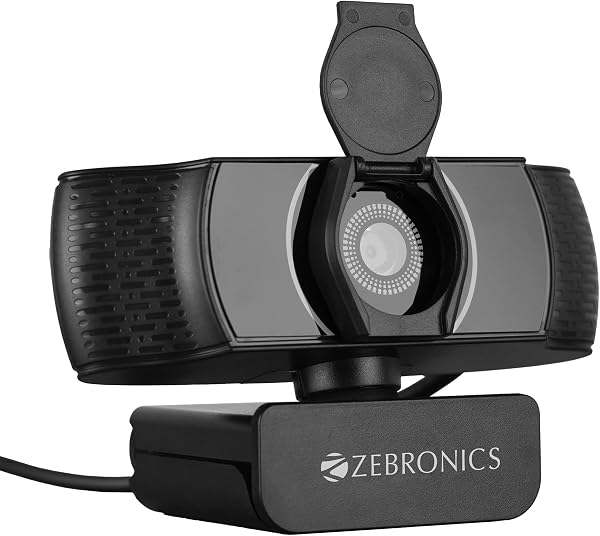
BigPassport 1080p30fps Ultra HD Webcam with Mic: The Complete Buying Guide for Indian Buyers

About Rahul Verma: Rahul is a tech enthusiast and gadget reviewer with over 8 years of experience testing consumer electronics. He specializes in audio gear, smartwatches, and mobile accessories. When he is not testing products, you will find him exploring the latest in AI and smart home technology.

If you have sat through more video calls in the last three years than in the previous ten combined, you already know the pain of a laptop's built-in camera. Grainy frames, a microphone that makes you sound like you are calling from inside a tin box, and the constant "sorry, your video froze" from the other side. For most Indian buyers — students writing proctored exams, teachers running online classes, professionals in hybrid jobs, and families doing long-distance video calls — the sensible fix is not a ₹80,000 laptop upgrade. It is a ₹1,500 webcam.
The bigpassport 1080p30fps ultra hd webcam with mic sits right in that sweet spot. It promises full-HD capture at a smooth 30 frames per second, a built-in microphone, and plug-and-play setup for well under ₹2,000. But is it actually good enough for an interview, an online exam, or a client demo? In this guide, we break down exactly what you get, how it compares with options at ₹1,000 and ₹5,000, where to buy it in India for the best price, and the practical tips that make a budget webcam look far more expensive than it is.
Understanding the BigPassport 1080p30fps Ultra HD Webcam with Mic
BigPassport is an Indian accessories brand that sells dashcams, webcams, and computer peripherals, primarily through Amazon India and Flipkart. The bigpassport 1080p30fps ultra hd webcam with mic is its mainstream webcam offering — a USB-A plug-and-play camera aimed at the work-from-home and online-class segment.
Let us decode the name, because every part of it matters when you are spending your money:
- 1080p — a resolution of 1920 × 1080 pixels, which is Full HD. This is the standard that Zoom, Google Meet, Microsoft Teams, and most Indian online exam platforms expect. Anything below this (720p) looks soft on a 24-inch monitor.
- 30fps — thirty frames per second. This is the difference between motion that looks natural and motion that stutters. Many budget webcams claim 1080p but only deliver 30fps at 720p, dropping to 15fps at full resolution. A genuine 1080p/30fps pipeline is the benchmark for smooth video.
- Ultra HD — a marketing term here. Strictly speaking, "Ultra HD" means 4K, but in the budget segment it is used to describe Full HD capture. Do not expect 4K from a sub-₹2,000 camera; expect clean, well-lit 1080p.
- With mic — a built-in omnidirectional microphone, so you do not need a separate headset for basic calls.
What this camera is not: it is not a streaming-grade camera with autofocus and a large sensor. It is a fixed-focus, everyday webcam designed to make you look presentable and sound clear on a video call. Judged on those terms, it does a competent job — and there is a large group of buyers for whom that is exactly enough.
What You Actually Get in the Box
Typical retail packaging for the bigpassport 1080p30fps ultra hd webcam with mic includes the camera unit, a foldable clip mount that doubles as a stand for desks and monitors, and a quick-start card. There is no separate driver CD — the camera uses the USB Video Class (UVC) standard, which means Windows, macOS, and Linux all recognise it automatically.
Setup is genuinely a two-minute job: plug the USB cable into a free port, open your video app, select the camera and microphone from the settings dropdown, and you are live. On Windows 11, go to Settings → Bluetooth & devices → Cameras to confirm the camera is detected. On a Mac, open System Settings → Privacy & Security → Camera and make sure your browser or app is ticked.
Warranty is typically a one-year replacement policy handled through the seller — confirm the exact terms on the product listing before you buy, because third-party sellers sometimes differ from the brand's official store.
Why 1080p at 30fps Is the Right Baseline in 2025
There is a real case for not overpaying here. Most Indian video-call use cases are bandwidth-limited, not camera-limited. A typical home broadband connection on JioFiber or Airtel Xstream offers 2–10 Mbps of upload speed, and Zoom or Meet will compress your video to roughly 1–2 Mbps for a 1080p call anyway. A ₹12,000 webcam on a 3 Mbps upload line will not look meaningfully better than a good ₹1,500 one.
What does make a visible difference, in order of impact:
- Lighting — facing a window beats any camera upgrade.
- Camera position — at eye level, not looking up your nose from the laptop deck.
- Resolution and frame rate — 1080p/30fps clears the bar.
- Sensor quality and autofocus — the expensive part, and where budget cameras fall behind.
For interviews, online exams, and client calls where you sit still and speak, a fixed-focus 1080p/30fps camera with decent lighting is genuinely sufficient. That is precisely the use case the bigpassport 1080p30fps ultra hd webcam with mic is built for.
Key Factors to Check Before You Buy Any Webcam in India
1. True sensor output vs. interpolated resolution
Many cheap webcams advertise "1080p" but use a 720p sensor and upscale the image digitally. The result is soft, smeared detail. Ask two questions: is the listed frame rate 30fps at 1080p (not just at 720p), and does the listing mention a CMOS sensor with a real specification? Interpolated cameras usually avoid mentioning the sensor at all.
2. Autofocus or fixed focus
Almost every camera under ₹2,000 has fixed focus, usually set between 50 cm and 1 metre. This is fine if you sit at a desk. It is a problem if you want to hold up a document, a product, or an ID card to the camera — it will be blurry. If you teach, sell on video, or routinely show objects on camera, stretch to a model with autofocus.
3. Microphone quality and placement
Built-in mics on budget webcams are functional but pick up keyboard clatter, ceiling fans, and traffic. In an Indian home office, a ceiling fan running at speed 3 is the single biggest audio problem. Position the webcam in front of you, away from the fan's airflow, and consider a ₹500 collar mic if you record content regularly.
4. Mounting and cable length
Check that the clip opens wide enough for your monitor's bezel — slim laptops and thick gaming monitors need different grips. A 1.5-metre cable is typical; if your desktop tower sits under the desk, you may need a USB extension cable (₹150–₹250 on Amazon).
5. Privacy shutter and indicator light
A physical slide shutter is not paranoia in 2025. Look for a model with a built-in lens cover, or buy a ₹99 stick-on privacy slider separately. A visible LED that turns on when the camera is active is a useful secondary confirmation.
6. Compatibility with Indian exam and workplace software
Most proctored exam platforms (university portals, NTA-linked systems, banking recruitment tests) require a UVC-compliant webcam with no proprietary driver. The BigPassport unit is driver-free, which generally works well with these platforms — but always test the camera on the exam platform's mock test a day before, never on the morning of the exam.
BigPassport 1080p30fps Ultra HD Webcam with Mic: Specifications at a Glance
| Feature | Typical Specification | What It Means for You |
|---|---|---|
| Resolution | 1920 × 1080 (Full HD) | Sharp enough for Zoom, Meet, Teams and exam portals |
| Frame rate | 30fps at 1080p | Smooth motion; no visible stutter in conversation |
| Focus | Fixed focus (approx. 50 cm–1 m) | Great for desk work; poor for showing documents up close |
| Microphone | Built-in omnidirectional | Fine for calls; add an external mic for recording |
| Connectivity | USB 2.0 Type-A, plug and play | No drivers; works on Windows, macOS, Linux, Chrome OS |
| Field of view | Wide-angle lens (approx. 90°) | Fits two people or a full desk setup in frame |
| Mount | Foldable clip + desk stand | Fits most laptops and monitors |
| Indicative price | ₹1,199 – ₹1,799 | Budget segment; check live pricing before ordering |
Note: specifications and pricing vary slightly between listings and sellers. Always verify on the live Amazon or Flipkart product page before purchasing.
Product Recommendations at Different Price Points
The bigpassport 1080p30fps ultra hd webcam with mic is one option among several. Here is an honest ladder of choices depending on your budget and use case.
Under ₹1,000 — Basic 720p cameras
At this price you are looking at 720p/30fps cameras from generic brands. They are acceptable for occasional family calls but will look soft on a large screen, and the microphones are noticeably weaker. Verdict: only if your budget is genuinely fixed. Spending ₹300–₹500 more gets you a real upgrade.
₹1,200–₹1,800 — The BigPassport sweet spot
This is where the BigPassport unit competes. You get genuine 1080p/30fps, a wide-angle lens, plug-and-play USB, and a usable microphone. For students, teachers, and office workers on routine video calls, this is the value pick. Amazon frequently discounts this band during sales, and Flipkart's electronics offers occasionally undercut it further.
₹1,800–₹2,800 — Branded 720p/1080p with better build
At this level you start seeing better lens coatings and more reliable firmware — a well-known 720p camera from an established brand can outperform a no-name 1080p one in poor light. If your priority is reliability over raw resolution, this band makes sense.
₹3,500–₹6,000 — Autofocus Full HD cameras
This is the first meaningful step up: autofocus, better low-light handling, sometimes a privacy shutter and dual microphones. If you teach online, demo products, or take client calls daily, this is the tier worth saving for.
₹7,000+ — Streaming and 4K cameras
Only worth it if you are producing content, streaming, or need 4K capture for professional recording. For everyday Indian WFH use, it is overkill and your upload bandwidth will bottleneck it anyway.
BigPassport 1080p30fps Ultra HD Webcam with Mic — Pros and Cons
What works well
- Genuine 1080p at 30fps — the frame rate holds up in normal room lighting, which is more than many rivals at this price manage.
- Zero-setup plug and play — no drivers, no software installs, no admin permissions needed on office laptops.
- Wide field of view — useful for family calls, small-group classes, and showing your desk setup.
- Strong value — full-HD output for roughly the price of two movie tickets.
- Works across platforms — Windows, macOS, Chrome OS, and most exam proctoring software that expects UVC cameras.
Where it falls short
- Fixed focus — documents, IDs, and close-up objects will be blurry. This is the biggest limitation.
- Average low-light performance — in a dim room, expect visible noise. You will need decent lighting.
- Basic microphone — clear enough for calls, not for recording. Fan noise and keyboard clicks come through.
- No autofocus or exposure smarts — if you move or the light changes, you may need to adjust manually via your app.
- Seller variability — buy from the brand's official store or a well-rated seller; a few marketplace listings have mismatched specs.
Where and When to Buy in India
Both Amazon India and Flipkart list BigPassport webcams, and prices swing by 20–35% across the year. Here is a practical buying calendar:
- Amazon Great Indian Festival (usually late September–October) — the deepest discounts on computer peripherals. This is the best window if you can wait.
- Flipkart Big Billion Days (same period) — compare both platforms; bank offers often decide the winner.
- Republic Day and Prime Day sales (January and July) — smaller discounts, typically 10–20%.
- Back-to-school and admission season (June–August) — webcam demand spikes ahead of online exams and new semesters, so prices firm up rather than fall. Buy before, not during.
Bank offers matter more than coupon codes. A 10% instant discount on HDFC, ICICI, or SBI credit cards often saves more than the listed deal price. Also check the "exchange" and "no-cost EMI" options — on a ₹1,500 product, EMI is unnecessary, but the card discount is not.
Buying checklist before you click "Buy Now":
- Confirm the seller is the brand's official store or has a 90%+ positive rating.
- Check that the listing explicitly says 1080p at 30fps.
- Read the most recent 20 reviews, sorted by "recent" — old reviews reflect old stock.
- Verify the return window (typically 7–10 days on Amazon; 7 days on Flipkart for electronics).
- Screenshot the specifications at purchase in case of a dispute.
Real-World Usage Tips for Indian Buyers
Fix your lighting before you blame the camera
Place a window or a ₹700 LED desk lamp in front of you, not behind. Backlighting from a window is the number one reason people look like silhouettes on video calls. A ring light at 45 degrees gives a flattering, professional look for interviews and teaching.
Manage your upload bandwidth
On a 4 Mbps upload connection, do not run a 1080p stream while someone else is on a cloud backup or a 4K YouTube stream. Use 5GHz Wi-Fi or, better, a LAN cable if your router is in another room. If your calls still stutter, drop the video quality in Zoom to 720p — it will look better than a struggling 1080p feed.
Kill the fan noise, not the fan
You cannot switch off the fan in a Chennai summer. Instead, angle the webcam so the fan is behind it rather than beside it, and use noise suppression in Zoom or Meet (both have it built in). A cheap foam windscreen over the mic grille also helps.
Position the camera at eye level
Prop the webcam on a stack of books or use a small tripod if your laptop sits low. The "looking up at you" angle is the single most unflattering framing in video calls, and it is free to fix.
Test before the exam, not on the day
For proctored exams, run the platform's system check at least 24 hours in advance with the bigpassport 1080p30fps ultra hd webcam with mic connected, and confirm the browser has camera permission. Many exam portals block newly connected devices until permissions are re-granted.
Add a USB extension for desktop towers
If your CPU sits under the desk, a 1.5-metre cable will not reach comfortably. A ₹200 USB 2.0 extension cable solves it and does not affect video quality at this resolution.
Frequently Asked Questions
Is the BigPassport 1080p30fps Ultra HD Webcam with Mic good enough for online exams?
Yes, for most Indian university and recruitment exam platforms. It is UVC-compliant, driver-free, and outputs 1080p at 30fps, which meets typical proctoring requirements. The fixed focus is fine as long as you sit at a normal desk distance. Test it on the exam platform's mock test beforehand, and ensure your room is well lit — proctoring software sometimes flags dark frames as suspicious.
Does it work with Windows 11, macOS, and Chromebooks?
It works on all three without additional drivers, because it follows the USB Video Class standard. On macOS you must grant camera permission to each app individually. On Chrome OS, it appears automatically in the camera settings of Meet and other web apps.
Do I need to install any software?
No. Windows, macOS, and Linux recognise it as a standard camera. If you want to adjust brightness, contrast, or exposure, use your video app's settings or the built-in Windows Camera app's "Manage video settings" panel.
Can I use it for YouTube or Instagram Live?
You can, and the 1080p/30fps output is adequate for both. However, the fixed focus and basic microphone will limit you compared with even an entry-level smartphone camera. For casual live streams it is fine; for regular content creation, invest in a camera with autofocus and an external mic.
Why does my video look grainy?
Almost always lighting. Budget webcams raise their ISO in dim rooms, which introduces noise. Add a light source in front of you and the same camera will look dramatically cleaner. Second most common cause: a USB hub or extension that is underpowered — plug directly into the laptop or a powered hub.
Is the microphone good enough for client calls and interviews?
For calls in a quiet room, yes — voice is clear and intelligible. In a room with a fan, traffic, or a noisy household, it will pick up background sound. Use headphones with a mic, or a ₹500–₹900 collar mic, if audio quality is business-critical.
Where is the cheapest place to buy it in India?
Amazon India and Flipkart are the main channels, and they undercut each other during sale events. Historically the lowest prices appear during the September–
Affiliate Disclosure:
This post contains affiliate links. We may earn a commission when you purchase through our links, at no extra cost to you.
Share this: