
Zebronics Pure Plus 4K Webcam: Complete Buying Guide, Price & Honest Review for Indian Buyers

About Rahul Verma: Rahul is a tech enthusiast and gadget reviewer with over 8 years of experience testing consumer electronics. He specializes in audio gear, smartwatches, and mobile accessories. When he is not testing products, you will find him exploring the latest in AI and smart home technology.
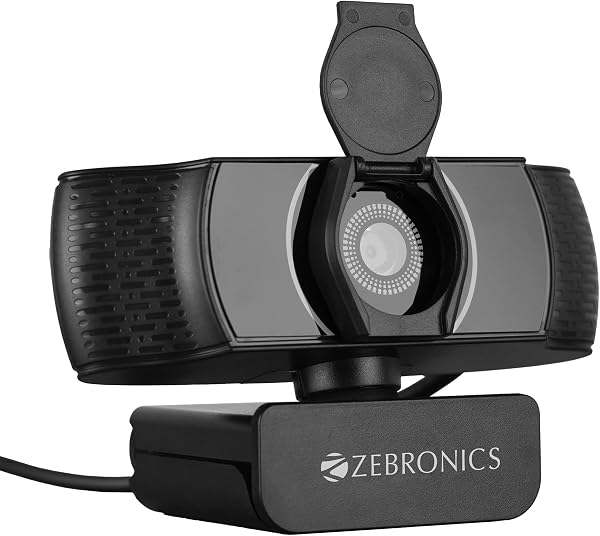
If you have spent the last couple of years on video calls with a laptop webcam that makes you look like you are broadcasting from a dimly lit cave, you are not alone. Between client demos, online classes, remote interviews and the occasional family Zoom call, the quality of your camera has quietly become part of your professional image. That is exactly the gap the Zebronics Pure Plus 4K webcam is trying to fill — a made-in-India 4K option priced well below the imported big names.
In this guide you will find a clear breakdown of what this webcam actually offers, how it compares with alternatives at ₹1,500, ₹5,000 and ₹15,000 price points, where to buy it in India for the best value, and which sale windows to wait for. We also cover practical setup tips for Indian homes — erratic lighting, fibre broadband upload limits, dusty desks and everything in between — plus a candid look at the limitations you should accept before you click "Buy Now".
What Is the Zebronics Pure Plus 4K Webcam?
Zebronics is a Chennai-headquartered peripherals brand that has been selling keyboards, speakers, monitors and webcams in India for decades, and its webcam range has become popular largely because of aggressive pricing and wide offline availability. The Zebronics Pure Plus 4K webcam sits at the top of that range: a plug-and-play USB webcam rated for 4K UHD capture, positioned for people who want noticeably sharper video than a 1080p budget cam without paying Logitech Brio money.
It is a UVC (USB Video Class) device, which is the important technical detail — it means no drivers, no companion app and no tinkering with firmware. You plug it into a laptop or desktop, and it appears in Zoom, Microsoft Teams, Google Meet, Webex, OBS or any other app that can read a camera feed. For a home office in India where the "IT department" is often you, that is a genuinely useful feature.
Spec snapshot at a glance
Brand specifications do get revised between batches, so treat the table below as a buying checklist rather than gospel — confirm each line against the current Amazon or Flipkart listing before you order.
| Feature | What to expect in this class | Why it matters to you |
|---|---|---|
| Maximum resolution | 4K UHD (3840 × 2160), i.e. roughly 8.3 MP | Gives you cropping headroom and a sharper downscaled 1080p feed on calls |
| Frame rate | Typically 4K at 30 fps; higher fps at 1080p | 30 fps is fine for meetings; 60 fps only matters for gaming/action |
| Lens | Wide-angle, roughly 80–90° diagonal field of view | Fits two people at a desk; too wide will show your whole room |
| Focus | Verify on the listing — fixed focus is common at this price | Fixed focus is fine at desk distance, awkward for close-up demos |
| Microphone | Built-in mic (single or dual) with basic noise reduction | Usable for calls; a ₹2,000 collar mic still sounds better |
| Mount | Clip-on stand with 1/4-inch tripod thread, tilt/swivel | Works on laptop lids and monitors; tripod thread is a bonus |
| Connectivity | USB Type-A cable, plug-and-play UVC | No drivers; works across Windows, macOS, ChromeOS and Linux |
| Indicative street price | Roughly ₹2,500–₹4,500 depending on seller and sale | Undercuts imported 4K webcams by a wide margin |
| Warranty | Usually 1 year, serviced through Zebronics service centres | Check that a service point exists in your city before buying |
Key Factors to Consider Before Buying a 4K Webcam in India
Most webcam buyers in India over-index on the resolution number and ignore everything else. That is a mistake, because a well-lit 1080p camera will beat a badly exposed 4K camera in every meeting you attend. Here is what actually drives perceived quality, in order of importance.
1. Sensor size and low-light performance
A 4K badge tells you the pixel count, not the pixel quality. Budget webcams squeeze 8 megapixels onto a tiny sensor, which means each pixel collects very little light. In a typical Indian bedroom-turned-office with a single warm LED bulb, that translates to visible grain and washed-out skin tones. If your desk is far from a window, budget for a ₹1,000–₹1,500 ring light or a desk lamp placed behind the camera — it will improve your video more than any resolution upgrade.
2. Frame rate versus resolution
Meeting apps such as Zoom, Teams and Google Meet typically compress your video to 720p or 1080p anyway. The real benefit of a 4K sensor in a webcam is that it downsamples to a cleaner 1080p image, and lets you crop digitally if you use software like OBS. Do not pay extra for 60 fps unless you are recording gameplay or fast-motion demos.
3. Autofocus and field of view
Fixed-focus lenses are tuned for roughly arm's-length distance, which is exactly where you sit on a video call — so they are perfectly serviceable. But if you plan to show documents, whiteboards or product samples to the camera, autofocus matters. Similarly, a very wide field of view is a double-edged sword: it fits a colleague beside you, but it also exposes your laundry rack. Check the stated FOV and, where possible, look at sample footage in reviews.
4. Microphone quality
Almost every webcam in this price bracket has an average built-in mic. It will get you through a call, but it picks up fan noise, keyboard clatter and the ceiling fan hum that is a fact of life in most Indian homes between April and July. If your work involves client calls or interviews, plan on a separate wired or wireless mic eventually.
5. Mounting and cable length
Confirm two things that listings often bury: whether the clip opens wide enough for your monitor's bezel (thin laptop lids are easy, thick gaming monitors are not), and the cable length. A short cable forces you to sit awkwardly close to a desktop tower. A 1.5 m cable is comfortable; anything under a metre is a nuisance.
6. Warranty and service reach
This is where homegrown brands differ sharply from Logitech. Zebronics has service partners in most major cities, but if you are in a tier-3 town, a warranty claim may mean couriering the unit. Ask yourself whether the 30–40% saving over an imported brand is worth a slower replacement process. For most buyers, it is — but go in with eyes open.
Zebronics Pure Plus 4K Webcam: Detailed Breakdown
Video quality in real-world Indian conditions
In decent, front-facing daylight the Zebronics Pure Plus 4K webcam delivers visibly crisper footage than a laptop's built-in camera — text on a shared screen reads cleanly, and your face has actual detail rather than a soft smear. The 4K rating is best treated as a stills/recording capability; most meeting software will pull a 1080p stream, and that downscaled image is where you will see the practical benefit. In low light the image softens and grain creeps in, which is normal for this sensor class and not a defect.
Audio performance
The built-in microphone is adequate for one-on-one calls in a quiet room. It handles normal speech at a metre without distortion, and the noise handling is basic but present. For anything involving a client, a recording, or a room with a ceiling fan on full speed, a dedicated mic is the single biggest upgrade you can make to your call quality.
Build, mounting and everyday handling
The body is lightweight plastic, as expected at this price. The clip doubles as a desk stand with tilt adjustment, and the 1/4-inch tripod thread means you can screw it onto a cheap ₹400 tripod for a more flattering eye-level angle — a small feature that genuinely improves how professional you look on camera. If your unit ships with a privacy shutter, use it; if it does not, a piece of black tape or a slip-on cover costs almost nothing and is worth the peace of mind.
Compatibility and setup
Setup is genuinely plug-and-play: connect the USB cable, open your meeting app, and select the camera from the video settings. It works with Windows 10/11, macOS, ChromeOS and most Linux distributions because it relies on the standard UVC driver stack. One practical note — if you plan to capture 4K, connect to a USB 3.x port (usually blue, or marked "SS") rather than an older USB 2.0 port, and avoid unpowered USB hubs, which are a common cause of dropped frames and flickering video.
Pros and cons of the Zebronics Pure Plus 4K Webcam
What works well:
- Price-to-resolution ratio: genuinely one of the cheapest routes to a 4K-rated sensor in India, often at half the cost of a comparable imported model.
- Zero-friction setup: no drivers, no app, no account creation — plug in and it works.
- Tripod thread: rare at this price and useful for streaming or standing-desk setups.
- Wide compatibility: behaves identically across Windows, macOS and Linux, which matters for mixed-device households.
- Easy availability: stocked on Amazon and Flipkart and widely sold offline, so replacement is quick if you buy locally.
What to keep in mind:
- Low-light performance is average: expect grain unless you add lighting.
- Software support is minimal: there is no feature-rich control panel for exposure, white balance or field-of-view tuning; you rely on your meeting app's settings.
- Spec consistency varies by batch: autofocus, privacy shutter and mic configuration have differed across listings, so read the current product page carefully rather than assuming.
- Audio is basic: fine for internal calls, not for professional recordings.
- Plastic build: treat the clip gently; thin plastic hinges are the usual failure point on budget webcams.
Comparison: Where the Zebronics Pure Plus 4K Webcam Fits in the Market
Prices below are indicative of typical Indian street pricing at the time of writing and move constantly during sale events — always verify on the live listing.
| Option | Indicative price | Resolution | Best for |
|---|---|---|---|
| Entry 1080p webcams (Zebronics, Portronics, Enter) | ₹900 – ₹1,800 | 1080p | Students, occasional calls, tight budgets |
| Zebronics Pure Plus 4K webcam | ₹2,500 – ₹4,500 | 4K-rated | WFH professionals, teachers, content creators on a budget |
| Logitech C270 / C310 class | ₹1,400 – ₹2,800 | 720p–1080p | Reliability and brand service over resolution |
| Logitech C920 / C925e class | ₹5,500 – ₹8,500 | 1080p with autofocus | Frequent callers who want polished, reliable 1080p |
| Premium 4K (Logitech Brio, Obsbot, Insta360) | ₹14,000 – ₹25,000 | 4K with HDR and software suite | Streamers, podcasters, professional presenters |
Under ₹2,000
At this price you are buying a 1080p cam and should expect it. It will be a clear step up from a five-year-old laptop webcam, which is often all a student needs. Do not stretch for "4K" marketing at this end of the market — the sensor simply cannot deliver it convincingly.
₹2,500 – ₹4,500 (where this webcam sits)
This is the sweet spot for Indian WFH buyers. The Zebronics Pure Plus 4K webcam competes here against older 1080p Logitech models and a crowd of Chinese-brand 2K/4K cams. If resolution and a tripod mount matter more to you than brand service depth, this is the value pick. If you would rather have guaranteed autofocus and better low-light handling, a 1080p Logitech in the same band is the safer, if less flashy, choice.
₹5,500 – ₹8,500
This is where Logitech's C920-class cameras live, and they are still the benchmark for "it just works, every single call, for years." You are paying for autofocus consistency, better colour science and easier warranty service. Worth it if video calls are core to your income.
Above ₹14,000
Premium 4K webcams with HDR, larger sensors and proper companion software. Overkill for Zoom and Teams. Justified only if you are producing content, streaming, or recording courses where the footage is the product.
Where and When to Buy for the Best Price in India
Amazon vs Flipkart: for Zebronics products, Amazon usually has deeper stock and more transparent seller ratings, while Flipkart sometimes undercuts during its own sales. Check both on the same day — the gap can be ₹300–₹700. Look for listings marked as fulfilled by the platform rather than a third-party seller with no return policy.
Offline advantage: Zebronics has strong distribution in computer accessory shops and Croma/Reliance Digital-type stores. If you want to physically check the mount and cable, buy locally — you will often pay ₹200–₹400 more, but warranty handling becomes a walk-in rather than a courier transaction.
When to buy: the biggest discounts in India land during Republic Day sales (late January), Amazon Prime Day (usually July), Flipkart's Big Billion Days (September–October) and the Amazon Great Indian Festival that runs alongside it. Diwali season is reliably the lowest price of the year. Expect 20–35% off MRP during these windows; outside them, prices are fairly stable.
Affiliate Disclosure:
This post contains affiliate links. We may earn a commission when you purchase through our links, at no extra cost to you.
Share this:


