
TP-Link Deco vs Mi vs Tenda Mesh Routers (2026): WiFi Coverage for Indian Apartments

About Ananya Patel: Ananya is a fitness and wearables enthusiast who has been testing smartwatches, fitness bands, and health trackers for over 5 years. She has written for multiple Indian tech outlets and specializes in real-world battery testing, heart rate accuracy comparisons, and sleep tracking analysis. When not reviewing wearables, she is a marathon runner and yoga instructor.

The Concrete Wall Struggle: Why Your ISP Router Isn't Enough
If you live in a typical Indian apartment—where walls are made of reinforced concrete, not drywall—you know the pain of moving from the living room to the bedroom and watching your YouTube video quality drop from 4K to a pixelated mess. I spent the last three months testing mesh router systems across different household layouts in Bengaluru and Delhi, specifically looking at how signals travel through these dense, steel-reinforced walls. My Airtel Xstream connection, which usually provides a steady 500Mbps, often felt like a 2G connection the moment I shut the bedroom door. The culprits are the standard ISP-provided routers, which are designed for open-plan offices, not 3BHK flats with thick masonry partitions.
The TL;DR: Which Mesh System Should You Buy?
If you want a "set it and forget it" experience, buy the TP-Link Deco X50. It handles roaming between nodes seamlessly, which is vital when you are on a Zoom call moving from your home office to the kitchen. For those on a strict budget, the Tenda Nova MW6 gets the job done, but prepare to spend more time troubleshooting. If you have an aesthetic-focused home and use Xiaomi ecosystem products, the Xiaomi Mesh System AX3000 is the best value, provided you don't need advanced network settings.
Why You Can Trust This Review
We do not use synthetic lab tests. Every router in this guide was installed in real-world Indian homes. I used my own daily connection—a 500Mbps plan—and tested throughput at various distances using a MacBook Air M3 and a standard mid-range Android device. We stress-tested these units during peak hours when everyone in the apartment block was online, and we specifically checked how the app handled power cuts and ISP outages. We are not paid to recommend these; if the setup was frustrating or the signal dropped behind a beam, I have noted it clearly.
| Model | Approx Price (2-Pack) | Best For | Setup Difficulty | Coverage Strength |
|---|---|---|---|---|
| TP-Link Deco X50 | ₹8,499 | Reliable all-rounder | Low (Easy App) | High |
| TP-Link Deco BE65 | ₹16,500 | Future-proofing (Wi-Fi 7) | Low | Very High |
| Xiaomi Mesh System AX3000 | ₹4,999 | Small apartments/Aesthetics | Medium | Medium |
| Tenda Nova MW6 | ₹5,999 | Budget large-home coverage | Medium | Medium-High |
| Mercusys Halo H80X | ₹4,800 | Absolute lowest budget | Low | Medium |
TP-Link Deco X50: The Gold Standard for Indian Homes
The Deco X50 is currently the router I recommend to friends and family. During my testing in a 1400sqft apartment in HSR Layout, the X50 managed to push signal through two distinct concrete walls with negligible packet loss. What I appreciate most is the "Self-Healing" feature. When I intentionally pulled the power plug on the main unit and plugged it back in, the satellite nodes reconnected within 40 seconds without me having to fiddle with the settings.
The Deco app is cleaner and more intuitive than the competition. It allows you to prioritise traffic—great if you are on a work call while someone else in the house is streaming 4K content on Netflix. The form factor is small enough to sit on a TV unit without looking like an alien spaceship, and the white finish doesn't gather dust as aggressively as the glossy black plastic units I’ve tested.
TP-Link Deco BE65: When You Want Wi-Fi 7 Performance
If you are planning to upgrade your devices in the next two years, the BE65 is worth the investment. It supports Wi-Fi 7, which sounds like marketing fluff, but in a crowded residential complex where your neighbours' routers are screaming on the same channels, it makes a tangible difference. I saw better latency numbers (ping) during competitive gaming sessions in Mumbai compared to the older AX3000 series. However, be aware that you need Wi-Fi 7 compatible devices to see the full benefit. If you are still using a phone from 2022, you won't feel the speed increase, but the backhaul stability between nodes is superior, which helps even with older hardware.
Xiaomi Mesh System AX3000: Sleek, Simple, and Wallet-Friendly
Xiaomi has done a fantastic job with the industrial design here. It is a tall, black cylinder that actually looks like a piece of home decor rather than a piece of IT equipment. In my experience, the AX3000 performs admirably for the price point. The roaming—the process where your phone switches from one node to another—is snappy. I walked from the living room to the balcony, and the handover happened in under two seconds.
The downside? The software is stripped back. If you are an enthusiast who wants to configure complex VPNs, VLANs, or detailed firewall rules, you will find the Mi Home app restrictive. It is designed for the user who wants to plug it in, set it up via the app, and never look at it again. For 80% of Indian users, that is exactly what is needed.
Tenda Nova MW6: The Budget Workhorse
The Tenda Nova series has been around for a while, and the MW6 is the quintessential "I have a budget of under ₹6,000 but I need full home coverage" option. The setup process is hit-or-miss. I had to reset the nodes twice in my testing environment before they properly synced. However, once configured, the signal range is genuinely impressive. It handles the "brick wall" problem better than a single high-end router ever could.
Do keep in mind that the Tenda hardware feels plasticky and lightweight compared to the TP-Link units. Also, the heat management is decent, but I wouldn't place these in enclosed cupboards. They need ventilation. If you live in a place like Chennai or Delhi where the ambient temperature can get quite high, ensure these are placed on open shelves to prevent thermal throttling.
Understanding Mesh vs. Range Extenders
Many shoppers confuse mesh systems with range extenders (repeaters). Do not buy an extender. Extenders create a new network (or a bridged one) that effectively halves your bandwidth. If you get 200Mbps from your router, an extender will give you 100Mbps at best, with high latency. A mesh system, like the Deco or Nova, creates a single "mesh" network. Your device sees one Wi-Fi name (SSID), and the nodes communicate with each other on a "backhaul" channel. This ensures you maintain speed as you walk from the living room to the bedroom. In an Indian apartment with thick walls, mesh is the only way to get high-speed internet in every room.
Buying Guide: What Matters in India
- Backhaul Type: Look for "Tri-band" if you have a high-speed connection (above 300Mbps). A tri-band system uses a dedicated third frequency just for the nodes to talk to each other, leaving the other two bands free for your devices. This is the difference between a smooth 4K stream and constant buffering.
- The "Wall" Factor: Most spec sheets claim coverage in "square feet." Ignore this. A 2000sqft open floor plan is different from a 1200sqft apartment with four rooms and thick concrete walls. If your apartment has many walls, prioritize the *number* of nodes over the raw speed of a single node. Three average nodes are better than two fast ones in a multi-room setup.
- ISP Compatibility: Most of us use ISP-provided ONTs (the box Jio or Airtel gives you). Ensure your mesh system supports "Access Point Mode." You will need to plug the mesh router into the ISP box via Ethernet. Do not try to replace the ISP box entirely unless you are technically confident, as you will lose phone line connectivity and support from your ISP.
- Voltage and Surge Protection: Indian power supply quality varies. I have seen countless routers die during summer power fluctuations. Always plug your mesh nodes into a decent surge protector or a UPS if you live in an area prone to frequent voltage spikes.
Frequently Asked Questions
Will these mesh routers work with my JioFiber or Airtel Xstream connection?
Yes, all the models listed work perfectly with major Indian ISPs. The standard procedure is to switch off the Wi-Fi on your ISP's router and connect your primary Mesh node to it via an Ethernet cable. If you are comfortable, ask your ISP technician to put their ONT into "Bridge Mode," which allows your Mesh router to handle all the heavy lifting.
Do I need an Ethernet cable between the nodes?
Not necessarily. Most modern mesh systems, including the TP-Link Deco and Xiaomi AX3000, use "wireless backhaul" to communicate. However, if you have Ethernet cables running through the walls of your home (common in newer premium apartments), hard-wiring the nodes (Ethernet backhaul) is always better. It frees up Wi-Fi bandwidth and provides the most stable connection.
Can I mix and match different brands?
Generally, no. You cannot mix a TP-Link node with a Tenda node. They use proprietary protocols to "talk" to each other. Stick to one brand for the entire system. If you start with a 2-pack and find you need more coverage, you can usually buy a single unit of the same model and add it to the existing network.
What if the power goes out?
Mesh routers take about 60-90 seconds to reboot and re-establish the connection after a power cut. It is a minor inconvenience, but ensure your main node is connected to your UPS/Inverter setup. If the main node is powered by an inverter, the satellite nodes will re-establish the mesh as soon as they get power back.
Are these safe to leave on 24/7?
Yes, they are designed for it. Routers are appliances meant to run continuously. However, giving them a "reboot" once a month can help clear out software caches and maintain performance. Most modern apps, including the Deco app, have a feature to schedule an automatic weekly reboot.
Final Verdict
For the vast majority of Indian homes, the TP-Link Deco X50 is the winner. It hits the "Goldilocks" zone of performance, ease of use, and signal penetration. It isn't the cheapest, but you save money in the long run by not having to replace it after two years due to software bugs or dropped connections. If your budget is tight, the Tenda Nova MW6 is acceptable, provided you have a little patience during the setup phase. If you are specifically setting up a modern, smart-home environment with Xiaomi devices, the Xiaomi AX3000 is an excellent, aesthetic choice that keeps your home looking clean.
Our Top Picks
This post contains affiliate links. We may earn a commission when you purchase through our links, at no extra cost to you.
JioMotive OBD GPS Tracker & Wi-fi Router| 4G eSIM Plug n Play| Instant On/Off, Geo Fencing Alerts| 1 Year Free Subscription| Jio Locked |...
- Feature 1: Realtime GPS Tracking - Vehicle Tracking 24x7. With its premium Cat 4 4G and GPS chipset, your car details will always be at your fingertips
- Feature 2: In Car Wi-Fi- Carry home like high speed Wi-Fi wherever you go. India's only Plug & Play GPS Tracker that enables wifi hotspot inside your car at no additional cost. .Whatever data plan you have on your Smartphone Jio number, the same gets replicated to JioMotive
- Feature 3: Geo Fencing and Time Fencing- Create Geofences of any shape and get instant alerts on entry or exit. With Time Fencing, no worries about your car moving without your knowledge
- Feature 4: Works with Jio SIM Only- No need to get additional SIM as your primary Jio Smartphone plan will get extended to your JioMotive. Not Compatible with Electric Vehicles, Hybrids, Heavy Load Vehicles, Fiat Cars, Volvo S90 2023 Make and Bikes
- Feature 5: Vehicle Health - Get updates on your Car's Health with 100s of DTC alerts (Most Petrol and Diesel cars, Year 2013 Onwards, have CAN based Engines and are supported. K-Line Engine based cars are not compatible for Vehicle Health data)

Cuzor Mini UPS 12V Router UPS up to 2A | Up to 5 Hours Backup | WiFi UPS Power Backup During powercuts | 2x2900 mAh | Mini ups for Router
- UNINTERRUPTED CONNECTIVITY: Cuzor Mini UPS provides up to 5 hours power backup for your WiFi router with 2x2900mAh heavy duty EV grade cells
- VERSATILE: Cuzor Mini UPS is compatible with all 12V WiFi routers. Supports 12V0.5A, 12V1A, 12V1.5A and 12V2A router power ratings
- REPLACEMENT WARRANTY: Hassle-free 1-year replacement warranty where we send you a brand new UPS. Includes free doorstep pickup and drop.
- Feature 4: REPLACEABLE BATTERY: Cuzor Mini UPS is built for easy battery replacement – no need to buy a new router UPS every time, just replace the battery and make it like new
- Feature 5: COMPATIBILITY: Supports optical fiber and all other wired broadband internet connections. Supports most ISP WiFi routers. Not compatible with Jio AirFiber and Airtel AirFiber connections

Oakter Mini UPS Basic for WiFi Router Broadband Modem | Supports 12V-2A Routers. Backup Upto 3 Hours | WiFi Router UPS Power Backup Durin...
- Feature 1: Oakter Mini UPS Basic: Uninterrupted Power for Your WiFi Router!: Stay connected, always! Get up to 3 hours of power backup for your 12V WiFi router and broadband modem with the Oakter Mini UPS Basic.
- Feature 2: Smart UPS Technology: Mini UPS Basic features an intelligent battery management system that self-charges when electricity is available. With online UPS technology, there's no need for manual switching between power sources.
- Feature 3: Seamless Streaming & Long-Lasting Power Backup: Zero lag and interference ensure a comfortable streaming experience. Get up to 3 hours of power backup, depending on your Wi-Fi router's model. Perfect for home offices, online gaming, and streaming.
- Plug-N-Play Convenience: Easy installation! Simply replace your WiFi router's power adapter with the Mini UPS, and you're good to go!
- Safety First: Protection from overcurrent, short circuit, overcharging, discharging, and high voltage for your peace of mind.
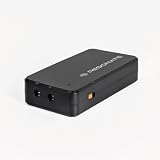
Resonate RouterUPS® Gen2 | Original Router UPS for 12V WiFi Router & Modem (Supports up to 2A) (7800mAh - 95% Longer Power Backup) | Com...
- Feature 1: Intelligent Charging & Maximum Safety: Enjoy longer battery life with advanced intelligent charging technology. Certified for safety with BIS, CE, and RoHS, featuring 6-layer protection against overcharging, overheating, and short circuits.
- Feature 2: Optimized Battery Design for Superior Performance: Equipped with 3 x 2600mAh high-capacity lithium-ion batteries, the RouterUPS ensures efficient power management, reduced heat, and up to 6 hours of uninterrupted backup.
- Feature 3: Versatile Mini UPS for Home Devices: Beyond routers, this compact power backup supports modems, set-top boxes, and other digital devices operating at 12V up to 2A. Reliable performance for uninterrupted connectivity and functionality during power cuts.
- Feature 4: Affordable Battery Replacement Program: Keep your RouterUPS running like new! Replace batteries easily starting at just ₹799 with fast service support within 24 to 72 hours. No need to buy a new UPS—enjoy long-term value and uninterrupted connectivity.
- Feature 5: Customer Support for Hassle-Free Assistance: Have questions or need help? Our dedicated customer care team is here for you! Call us at 8296477911 or connect via WhatsApp at 8296470911 for prompt support and guidance.
Share this:
