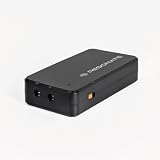
Cuzor Mini UPS Pro 12V Router UPS Up To 3A: The Complete 2025 Buying Guide

About Rahul Verma: Rahul is a tech enthusiast and gadget reviewer with over 8 years of experience testing consumer electronics. He specializes in audio gear, smartwatches, and mobile accessories. When he is not testing products, you will find him exploring the latest in AI and smart home technology.

If you have ever watched your Jio Fiber or Airtel Xstream router blink off during a two-minute power cut — right in the middle of a client call, an online exam, or the last over of a match — you already know why a router UPS has become a standard household purchase in India. The cuzor mini ups pro 12v router ups up to 3a is one of the more sensible answers to that problem, because it is built specifically for the slightly power-hungry routers that most 1A mini UPS units struggle with.
This guide is written for someone who is ready to buy, not someone browsing casually. We will cover what this device actually does, why the 3A rating matters more than most listings admit, how it compares with cheaper alternatives, what it will and will not power, how much you should pay on Amazon or Flipkart, and when to pull the trigger so you do not overpay. By the end, you should be able to decide in under five minutes whether the cuzor mini ups pro 12v router ups up to 3a is the right fit for your setup or whether a cheaper 2A unit will do the job just fine.
Quick Verdict: Who Should Buy the Cuzor Mini UPS Pro 12V 3A?
Buy it if your router or ONT uses a 12V adapter rated at 1.5A or higher — which includes most Wi-Fi 6 routers, Jio Fiber ONTs, Airtel Xstream boxes, and mesh nodes. Buy a cheaper 2A mini UPS if you are running an older single-band router that draws under 1A. Skip mini UPS units entirely and consider a full inverter if you also want fans, lights, or a desktop running through the outage.
| Parameter | Typical Specification | Why It Matters |
|---|---|---|
| Output voltage | 12V DC | Matches the standard router/ONT adapter output |
| Max output current | Up to 3A (approx. 36W) | Headroom for Wi-Fi 6 routers and ONT + router combos |
| Battery class | 10,000 mAh Li-ion (approx. 37 Wh) | Determines real-world backup time |
| Input | 12V DC from your existing router adapter | No separate charger needed |
| Connector | 5.5mm × 2.1mm DC barrel (adapter tips usually included) | Fit matters — some ONTs use 5.5 × 2.5mm |
| Charge time | Roughly 4–5 hours from empty | Plan the first charge before a planned outage |
| Protection | Overcharge, over-discharge, short circuit, reverse polarity | Protects both the UPS and your router |
| Indicative price | ₹1,999 – ₹2,499 | Varies widely across Amazon, Flipkart and brand store |
Note: Cuzor has revised this line more than once, so confirm the exact cell capacity and connector size on the current product listing before ordering. Specs below reflect the commonly sold Pro 12V 3A variant.
Understanding What a Router Mini UPS Actually Does
A mini UPS is not an inverter. It is a small DC uninterruptible power supply that sits between your router's power adapter and the router itself. Your existing 12V adapter plugs into the UPS, and the UPS feeds the router. While mains power is available, the UPS passes current through and simultaneously charges its internal lithium-ion cells. The moment power fails, it switches to battery in milliseconds — fast enough that your router does not reboot and your broadband session stays alive.
The practical benefit in Indian conditions is significant. Once the router stays up, your home Wi-Fi stays up, which means your fibre line stays up (ONT powered), your smart plugs and cameras keep working, and your mobile phone can stay on Wi-Fi calling instead of hunting for signal. In apartment complexes with frequent short outages, or in areas where the local distribution company does load-shedding for 30–60 minutes, this is genuinely useful rather than a gadget.
Why the "Up To 3A" Rating Deserves Attention
Most budget mini UPS units on Amazon India are rated 12V/1A or 12V/2A. That is fine for a basic 12V 1A router, but modern hardware has crept up. A Wi-Fi 6 router with four antennas can pull 18–24W. A Jio Fiber ONT paired with a separate router can touch 2.5A at peak during boot. When a UPS is undersized, you get one of two failure modes: the router reboots under load, or the UPS's protection circuit cuts output and you lose connectivity anyway.
The cuzor mini ups pro 12v router ups up to 3a is rated for roughly 36W of continuous output, which comfortably covers a single high-draw router plus a small ONT or a CCTV camera drawing under 10W. That headroom is the entire reason the Pro variant exists in Cuzor's lineup, and it is the reason you should not reflexively buy the cheapest 1A unit you find.
Key Factors to Consider Before You Buy
1. Read Your Router Adapter Label First
Flip your router's adapter over and look for "Output: 12V ⎓ X A". If X is 1A or 1.5A, a 2A mini UPS is adequate. If it reads 2A, 2.5A, or 3A — as many TP-Link Archer, Asus, Netgear and mesh systems do — you want the 3A-rated model. If the adapter says 9V or 5V, this particular product is not for you; you need a multi-voltage mini UPS.
2. Connector Size and Polarity
Almost all Indian routers use a centre-positive 5.5mm × 2.1mm DC barrel plug, but some ONTs and CCTV units use 5.5mm × 2.5mm. Check whether the listing includes interchangeable tips. Getting the polarity wrong — centre-negative devices exist, though they are rare — can permanently damage the router.
3. Real Backup Time vs Claimed Backup Time
A 10,000 mAh / 37 Wh battery with about 85% DC-to-DC efficiency gives you roughly 31 Wh of usable energy. Divide that by your router's actual draw:
- 8W router (12V, ~0.7A): roughly 3.5–4 hours
- 12W router (12V, 1A): roughly 2.5–3 hours
- 18W router (12V, 1.5A): roughly 1.5–2 hours
Any listing claiming six or eight hours is usually quoting a low-draw test router. Plan for the realistic numbers above and you will not be disappointed.
4. Pass-Through and Standby Behaviour
Good mini UPS units allow "pass-through" operation, meaning the router runs off mains while the battery charges. Cheap ones force the router to run off the battery continuously, which shortens battery life. Look for explicit mention of pass-through charging and, ideally, a trickle-charge cut-off that stops charging at full capacity.
5. Safety Certification and Warranty
Lithium cells in a ₹1,500 device demand caution. Prefer units that mention BIS certification, a proper protection IC, and at least a one-year warranty with an Indian service address. Cuzor is a Bengaluru-based brand with a real support channel, which is a meaningful advantage over unbranded imports.
Detailed Option Breakdown at Different Price Points
Best Overall: Cuzor Mini UPS Pro 12V Router UPS Up To 3A — ₹1,999 to ₹2,499
This is the primary recommendation for anyone running a modern router or a fibre ONT plus router combination. The 3A output ceiling gives you room to power a 12V router and a small CCTV camera together, and the 12V-only design keeps the circuitry simple and efficient rather than spreading it thin across 5V, 9V and 12V outputs like multi-voltage units do.
In day-to-day use, the value shows up in the boring moments: the router never reboots during a brief outage, so your video call recovers instantly rather than taking 90 seconds to re-establish DHCP and PPPoE. The unit is small enough to sit behind a TV console and does not need a dedicated socket beyond the one your router already uses.
Pros
- 3A / 36W output handles high-draw Wi-Fi 6 routers and dual-device setups
- Purpose-built for 12V router and ONT use, no wasted multi-voltage circuitry
- Indian brand with warranty support and local RMA
- Compact, silent, no fan, no noise in a bedroom setup
Cons
- Only 12V output — will not charge a phone or power a 9V device
- Battery is not user-replaceable in most revisions
- Backup drops sharply if you pair it with a high-draw router
- Stock on Amazon can be erratic; prices swing by ₹400–₹500
Value Pick: Cuzor Mini UPS 12V (2A, Non-Pro) — ₹1,299 to ₹1,699
If your adapter says 12V/1A or 12V/1.5A, the standard 2A Cuzor mini UPS does the same job for around ₹600–₹800 less. It is the right call for older TP-Link, D-Link, Tenda and iBall routers, and for single-device setups where you are not trying to run an ONT and a router simultaneously. Buy this only after you have physically read your adapter label.
Alternative: Oakter Mini UPS for Wi-Fi Router — ₹1,499 to ₹1,999
Oakter is the other well-established Indian name in this category, with a similar form factor and a broad retail presence in Croma and Reliance Digital as well as online. Its 12V variants are reliable, though the 3A-class output is not always available across every SKU. Worth considering if you want to walk into a store and buy the same day rather than wait on delivery.
Budget Option: Kuber / Portronics Mini UPS — ₹899 to ₹1,399
These get the job done for a single low-draw router on a tight budget. Build quality and protection circuitry are a step below Cuzor and Oakter, and warranty support can be slow. Reasonable for a second home, a PG room, or a router you do not depend on for work — not what we would recommend for someone whose income depends on staying online.
If You Need More Than the Router: Full Inverter — ₹4,500 to ₹7,000
A 600VA sine-wave inverter with a 100Ah battery will keep fans, lights, a router and a desktop running for hours. It is bulkier, needs installation, and costs three to four times as much, but it solves the entire flat rather than one device. Do not buy a mini UPS expecting inverter-level backup — that is not the category.
Comparison Summary
| Option | Output | Indicative Price | Best For |
|---|---|---|---|
| Cuzor Mini UPS Pro 12V 3A | 12V / up to 3A | ₹1,999 – ₹2,499 | Wi-Fi 6 routers, ONT + router, CCTV + router |
| Cuzor Mini UPS 12V 2A | 12V / up to 2A | ₹1,299 – ₹1,699 | Older 1A–1.5A routers |
| Oakter Mini UPS 12V | 12V / 1A–2A | ₹1,499 – ₹1,999 | Buyers who want offline retail availability |
| Kuber / Portronics budget UPS | 12V / 1A–2A | ₹899 – ₹1,399 | Secondary routers, tight budgets |
| 600VA inverter + battery | 230V AC | ₹4,500 – ₹7,000 | Whole-home backup, longer outages |
Buying Guide: What to Look For in a Router UPS
When you are comparing listings, ignore the marketing photographs and check four things in the specification table. First, the output current — it must meet or exceed your adapter's rated current. Second, the battery capacity in Wh or mAh, which tells you the real backup rather than the claimed one. Third, whether the unit supports pass-through charging, so the router runs on mains when power is available. Fourth, the protection list: overcharge, over-discharge, short circuit and reverse polarity are the minimum.
Beyond the spec sheet, look at the seller. On both Amazon and Flipkart, mini UPS units attract third-party sellers with inflated capacity claims. Prefer listings sold by the brand or by a recognised retailer, and read the most recent reviews specifically for mentions of the unit dying within six months or failing to hold charge after summer.
The cuzor mini ups pro 12v router ups up to 3a is a reasonable benchmark against which to judge everything else: 3A output, 10,000 mAh class battery, standard 5.5 × 2.1mm connector, Indian warranty. If an alternative beats it on all four at a lower price, buy the alternative.
Where and When to Buy for the Best Price
Pricing on this category moves in a narrow band but the timing still matters. During Amazon Prime Day, the Great Indian Festival, and Flipkart's Big Billion Days, mini UPS units typically drop 15–25%, which puts the Cuzor Pro 3A near ₹1,699–₹1,899. Outside sale periods, expect ₹2,099–₹2,499 depending on the seller.
- Amazon: Widest selection, fastest delivery, and the easiest returns if the connector does not fit. Set a price alert rather than buying at list price.
- Flipkart: Occasionally cheaper on Cuzor during Big Billion Days, but check that the seller is brand-authorised.
- Cuzor's own website: Sometimes runs direct discounts and bundles; useful
Affiliate Disclosure:
This post contains affiliate links. We may earn a commission when you purchase through our links, at no extra cost to you.
Share this: