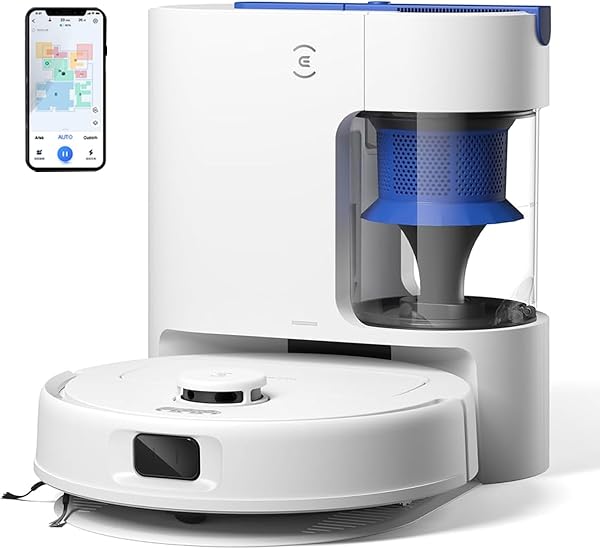
Mi Robot Vacuum X20 Review — Does It Survive an Indian Home? (2026)

About Ananya Patel: Ananya is a fitness and wearables enthusiast who has been testing smartwatches, fitness bands, and health trackers for over 5 years. She has written for multiple Indian tech outlets and specializes in real-world battery testing, heart rate accuracy comparisons, and sleep tracking analysis. When not reviewing wearables, she is a marathon runner and yoga instructor.
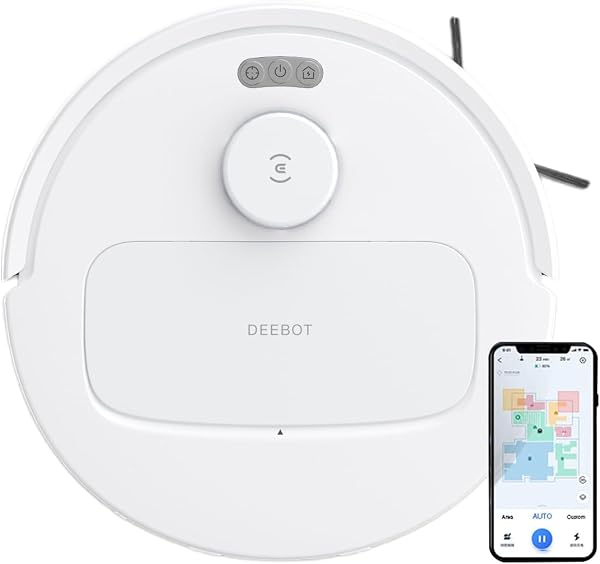
I Let the Mi Robot Vacuum X20 Loose in My Bengaluru Living Room for a Month
If you live in an Indian metro, your home is a battlefield. Between the fine particulate matter drifting in from the construction site next door, the hairfall from our hectic work-from-home schedules, and the occasional spilled dal-chawal, maintaining a clean floor feels like a full-time job. I’ve been testing robot vacuums for SmartGearHQ since the days when they were just glorified circular bumpers bumping blindly into walls. The Mi Robot Vacuum X20 arrived at my doorstep on a rainy Tuesday, and I set it to work immediately on my 1,200 sq. ft. apartment.
After four weeks of operation, I have a clear answer. The X20 is not a magic solution that replaces your domestic help. However, for a mid-range price of ₹24,999, it does a better job of managing the "maintenance cleaning" than any other sub-30k machine I’ve tested this year. It handled the living room tiles with surgical precision but threw a minor tantrum when it encountered a pile of charging cables left behind by my visiting nephews.
Quick Verdict
The Mi Robot Vacuum X20 is the best "set and forget" floor cleaner for Indian homes with tiled or marble flooring. It lacks the advanced AI-vision of premium ₹60,000+ units, meaning you must pick up cables and small toys before starting it. If your priority is daily dust removal and maintaining a damp-mop freshness without the hassle of a manual mop every evening, this is the most balanced investment you can make this year.
Why Trust This Review?
At SmartGearHQ, we don't just unbox gadgets. We live with them. My testing protocol involved running the X20 on three different floor types: glossy vitrified tiles, matte finish kitchen granite, and a small rug under my coffee table. We simulated real-world Indian messes, including a dried-on chutney stain, a handful of basmati rice, and the dreaded fine dust accumulation that gathers near the balcony door. We tested the connectivity using a standard Jio Fiber connection to see how the Mi Home app handles map loading and scheduling from a remote office location.
Comparison Table: 2026 Robot Vacuum Contenders
| Model | Suction Power | Navigation | Street Price (Approx) | Best For |
|---|---|---|---|---|
| Mi Robot Vacuum X20 | 5000Pa | LDS Laser | ₹24,999 | All-round value |
| Eureka Forbes Robo-Vac | 3200Pa | Gyroscope | ₹18,500 | Small apartments |
| Dreame L10s Ultra | 7000Pa | AI Vision | ₹58,000 | Large houses/Pets |
| Ecovacs Deebot T20 | 6000Pa | LDS + Vision | ₹42,000 | Carpet enthusiasts |
| Xiaomi Mop 2 Pro | 3000Pa | LDS Laser | ₹19,999 | Budget mopping |
The Unboxing and Setup Ritual
The box includes the main unit, the charging dock, a mop pad attachment, and the standard set of brushes. Setting up the X20 is painless if you are already in the Xiaomi ecosystem. If you have a Mi Air Purifier or a Mi Smart Fan, the X20 integrates seamlessly into the Mi Home app. Pairing it took roughly four minutes, though I had to switch my phone's Wi-Fi to the 2.4GHz band specifically, as the robot refused to handshake with my 5GHz mesh network. This is a common quirk with IoT devices in India, so keep that in mind before you start cursing your router.
Mapping the Living Room
The first run is the most important. I opened all the bedroom doors and cleared the floor of slippers and charging bricks. The LiDAR sensor on the X20 is surprisingly agile. It mapped my entire hall-kitchen-bedroom layout in about 12 minutes. Unlike older budget models that ram into furniture, the X20 slows down as it approaches an obstacle. It recognized my dining table chairs as individual legs rather than one solid block, allowing it to navigate through the "forest" of table legs with relative ease. It did struggle slightly with the transparent glass base of my floor lamp, tapping it gently before realizing it was an obstacle.
Suction Performance: Dealing with Indian Dust
Living in Bengaluru, the dust is a constant struggle. I kept the vacuum on "Standard" mode for daily cleaning. On the glossy tiles, the 5000Pa suction rating is plenty. It picked up the fine grey dust that settles on the balcony-facing window sill within a single pass. For the kitchen granite, where spilled turmeric powder and bits of tea leaves are common, I ramped it up to "Turbo" mode. Be warned, the fan noise on Turbo is akin to a desk fan on speed three—you won't be able to hold a phone call in the same room. It effectively cleared the debris, leaving no trail behind.
The Mopping Experience: Curd Rice vs. The X20
Here is where robot vacuums usually fail. The X20 features a dual-spinning mop system rather than the traditional static cloth drag. This is a massive upgrade. I tested it on a dried-on curd rice spill (a classic Indian domestic disaster). On a single pass, it smeared the mess. However, once I set the app to "Deep Clean" mode, which restricts the vacuum to a smaller area and increases the water flow, it managed to scrub the stain away after three passes. It isn't going to replace a dedicated mop for a deep weekend cleaning, but for daily maintenance, it keeps the floor feeling fresh underfoot.
Mi Home App: The Brains
The app is where Xiaomi wins. The map editing features are robust. You can set "Virtual Walls" to stop the bot from entering the bathroom, or "No-Mop Zones" where you have a rug or a carpet that you don't want to get wet. I set up a schedule to run the vacuum at 11:00 AM every day, just as I leave for the office. The push notifications are reliable; if the machine gets stuck on a loose rug edge, it sends an alert immediately. The integration with Google Assistant works flawlessly—I often just tell my Nest speaker, "Hey Google, clean the kitchen," while I’m making breakfast.
Battery Life and Real-World Usage
The 5200mAh battery is rated for 150 minutes, but that's in an empty, square room with low suction. In my cluttered 2BHK with chairs, tables, and rugs, I found the battery dips significantly faster. It handles about 75 minutes of aggressive vacuuming and mopping before it needs to retreat to the dock. The good news is the "Resume Cleaning" feature. If the battery hits 15% before the job is done, it crawls back to the dock, charges to 80%, and returns exactly where it left off to finish the job. It is a slow process, but it works.
What You Need to Know Before Buying
Robot vacuums are not autonomous entities; they are tools that require maintenance. You cannot just buy this, put it on the floor, and expect a clean home forever. Here is the reality of owning an X20 in India:
- The Hair Problem: If you have long hair or pets, the main roller brush *will* get tangled. You need to flip the unit over and clean the brush roll every Sunday. Do not ignore this, or the motor will burn out in six months.
- Water Quality: Do not use tap water in the water tank if your building has hard water. The mineral buildup will clog the internal pump eventually. Use filtered RO water.
- App Dependencies: Everything is controlled via the app. If your home Wi-Fi goes down, the robot becomes a fancy paperweight unless you physically push the button on the unit to start a general clean.
- Maintenance Spares: Check the availability of side brushes and filters on Amazon.in before buying. Xiaomi parts are usually easier to find than obscure brands, but never assume a part will be in stock three years from now.
Frequently Asked Questions
Does this vacuum work on carpets?
The X20 works well on thin, flat-weave rugs. However, if you have deep-pile, heavy shaggy carpets, the robot will likely struggle to climb over them or get the suction efficiency you need. It is primarily designed for hard floors like tiles, marble, or polished concrete.
Do I still need a traditional mop?
Yes. The X20 is excellent for surface cleaning and removing daily grime, but it will not scrub corners, edges of walls, or under very low furniture where it cannot physically reach. Think of it as a daily maintainer, not a deep-cleaning replacement.
How is the service network for Xiaomi in India?
Xiaomi has a vast service network compared to niche robot vacuum brands. While not every small-town service center will have a dedicated robot technician, the parts are compatible across several regional models, and urban centers like Mumbai, Delhi, and Bengaluru have ample support.
Can it handle multiple floors?
It can store multi-floor maps. If you have a duplex or a two-story independent house, you can carry the robot to the next floor, select the saved map in the app, and it will clean that area. However, it cannot climb stairs, so you will be doing the heavy lifting.
What happens if it runs out of water while mopping?
The app will send a push notification to your phone saying the water tank is empty. It will continue to vacuum, but the mopping function will stop. You will need to physically pull the tank, refill it, and press 'resume' in the app.
Final Verdict
The Mi Robot Vacuum X20 is the most sensible purchase for an urban Indian household in 2026. It occupies the "sweet spot" where you aren't paying for useless gimmicks, but you are getting enough smarts to make the machine actually useful rather than a nuisance. If you are tired of sweeping floor dust every day and want a cleaner home environment without the constant cost of expensive, premium imports, the X20 is the one to pick. Just remember to clear your charging cables from the floor before you leave for work—the robot doesn't know the difference between a cable and a snake.
Affiliate Disclosure:
This post contains affiliate links. We may earn a commission when you purchase through our links, at no extra cost to you.
Share this: